How Calligraphy Guide Paper Enhances Creative and Professional Workflows
Calligraphy Guide Paper serves as a foundational tool for artists, designers, educators, and professionals who require structure and precision in their handwriting, lettering, or layout planning. Designed with consistent guide lines and spacing, it supports a wide range of applications—from practicing calligraphy to drafting presentation layouts. When paired with digital tools and print-ready formats like PDF and PPT files, this type of paper becomes more than just a writing surface; it's a bridge between analog creativity and digital execution.
Understanding the Role of Calligraphy Guide Paper
At its core, Calligraphy Guide Paper provides visual alignment for letterforms, ensuring consistency in size, slant, and spacing. This is especially valuable for those learning calligraphy, developing a personal handwriting style, or preparing content for publication. The structured layout helps reduce the cognitive load of maintaining alignment manually, allowing users to focus on form, flow, and expression.
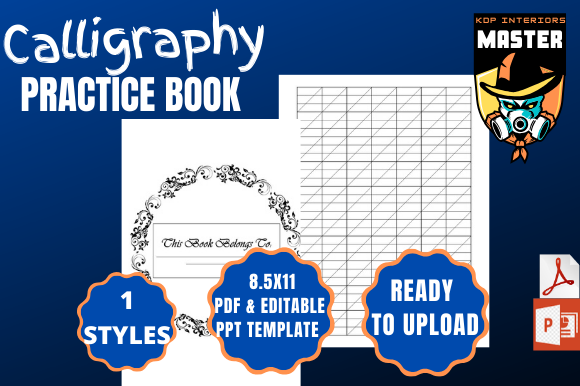
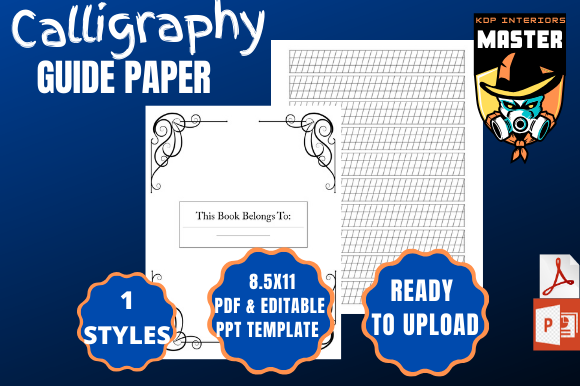
For professionals, this guide paper becomes a planning asset. Whether designing a hand-lettered logo, preparing a manuscript, or outlining a presentation, having a consistent baseline improves readability and aesthetic quality. The 8.5×11-inch format with 100 pages offers ample space for extended projects, while bleed-on settings ensure compatibility with print-on-demand platforms like KDP, making it ideal for creators aiming to self-publish.
Integration into Creative and Business Workflows
Calligraphy Guide Paper can be used at multiple stages of a project lifecycle. Before diving into digital design, it’s useful for sketching ideas, drafting copy, or refining lettering styles. During the execution phase, it supports iterative refinement, especially when preparing content that will later be digitized. After the creative process, it can serve as a reference or source material for scanned assets, ensuring consistency across printed or digital deliverables.
For example, a graphic designer might use the paper to sketch out a logo concept before digitizing it in Adobe Illustrator. A content creator might draft a book manuscript by hand first, using the guide lines to maintain a clean layout before scanning and formatting the text for eBook conversion. Educators and bloggers can use it to plan out visual content or presentation slides, later transferring the structure into a PowerPoint file for final polish and delivery.
Compatibility with Digital Tools and Platforms
This guide paper is often delivered as a downloadable PDF, making it instantly accessible across devices. The inclusion of a PPT file adds another layer of functionality, allowing users to import scanned or photographed pages directly into presentation decks. This dual-format delivery streamlines the transition from analog to digital, especially for those who prefer to work by hand before moving into software-based editing.
- PDF File: Ideal for printing or digital annotation using tools like Adobe Acrobat, Notability, or GoodNotes.
- PPT File: Useful for assembling visual presentations, especially when demonstrating process steps or showing before-and-after comparisons.
When preparing for KDP or similar platforms, bleed settings must be enabled to ensure that the final printed product aligns correctly without white borders or misalignment. This level of preparation is essential for self-publishers aiming to maintain a professional appearance in their printed books or guides.
Practical Implementation Tips
Integrating Calligraphy Guide Paper into your workflow doesn’t require a complete process overhaul. Start by identifying where structure and alignment can improve your output. Here are a few ways to apply it effectively:
- Use it for daily handwriting practice: Whether you're refining your script or building muscle memory, consistent practice on guide paper accelerates improvement.
- Incorporate it into content creation: Draft blog posts, outlines, or social media captions by hand before typing them up. This can help reduce screen fatigue and encourage deeper focus.
- Support design ideation: Sketch out page layouts, logos, or typography samples before moving into design software. This helps visualize spacing and hierarchy early in the process.
- Prepare for publishing: If you're self-publishing via KDP, use the guide paper to draft and align text before scanning and formatting for print. This ensures a polished final product.
Enhancing Efficiency and Consistency
One of the key benefits of using structured paper like Calligraphy Guide Paper is the ability to maintain consistency across multiple pages or documents. This is especially important for long-form projects such as books, journals, or branding materials. By using the same guide lines throughout, you ensure that all lettering and spacing remain uniform, reducing the need for extensive post-editing.
Additionally, because the paper is available as a downloadable file, it can be reused indefinitely. This makes it a cost-effective alternative to physical notebooks or printed guides, especially for frequent users or teams working on shared projects.
Quality Control and Long-Term Use
When preparing files for print, especially through platforms like KDP, it's essential to check the quality of your output. Using the guide paper consistently during the drafting phase helps minimize alignment errors, spacing issues, and formatting inconsistencies later on. Always preview your PDF before uploading to ensure that the bleed settings are correct and that all pages are properly oriented.
For long-term use, consider organizing your drafts and final versions in a digital archive. This allows you to reference past work, track progress over time, or reuse layouts for future projects. Labeling files clearly and maintaining a logical folder structure enhances accessibility and ensures that your creative process remains efficient.
Real-World Use Cases
Let’s look at how different professionals might incorporate Calligraphy Guide Paper into their daily routines:
- Freelance Designers: Use the paper to sketch logo concepts or layout thumbnails before moving into vector design tools.
- Authors and Bloggers: Draft chapters or articles by hand to reduce distractions and improve clarity before transferring to a word processor.
- Entrepreneurs: Outline business plans, pitch decks, or marketing copy using structured lines to maintain readability and professionalism.
- Educators: Create hand-lettered worksheets, lesson plans, or visual aids that can be scanned and shared digitally with students.
- Marketers: Draft social media captions or campaign ideas with consistent formatting to maintain brand voice and visual identity.
Each of these examples demonstrates how the guide paper supports both creative exploration and structured execution, making it a versatile tool across industries.
Final Thoughts on Workflow Integration
Calligraphy Guide Paper is more than a writing aid—it’s a practical component of a well-organized creative or professional workflow. Whether you're preparing for print, refining your handwriting, or organizing your thoughts before digitizing them, this tool provides the structure needed to maintain quality and consistency. With a 100-page format, bleed settings enabled, and compatibility with both PDF and PPT formats, it’s designed for real-world use in both analog and digital environments.
By understanding how to integrate this resource into your existing process, you can streamline your work, reduce errors, and elevate the quality of your final output—whether you're creating a personal journal, a published book, or a professional presentation.